
Sales Studio
What is Sales Studio? AI cold email outreach explained
ASAL Sales Studio is an AI cold email outreach system deployed for one client at a time, on their mailbox, their model and their data. Four agents find businesses that match who you sell to, write a short personal email sequence for each, send from your Gmail, Microsoft 365 or SMTP mailbox and read the replies. Every email waits for your approval in Discord before it is sent.
Outbound sales takes a steady stream of small jobs: finding the right companies, working out who to write to, writing something that is not a template, sending at sensible times and keeping track of replies. Sales Studio runs that loop for you and keeps a person in charge of what is sent.
Tas finds businesses that fit your ideal customer from public web sources and notes what each business's own website shows. Each email is built on one real finding about that business, so it does not invent claims. Replies are sorted into interested, not now and unsubscribe, and follow-ups stop when someone answers.
Each client gets their own deployment, with their mailbox, their choice of model and their data. Sales Studio is built on the open-source Sellbird project (AGPL-3.0), so you can ask for the source of your deployment.
AI cold email outreach examples: Sales Studio in action
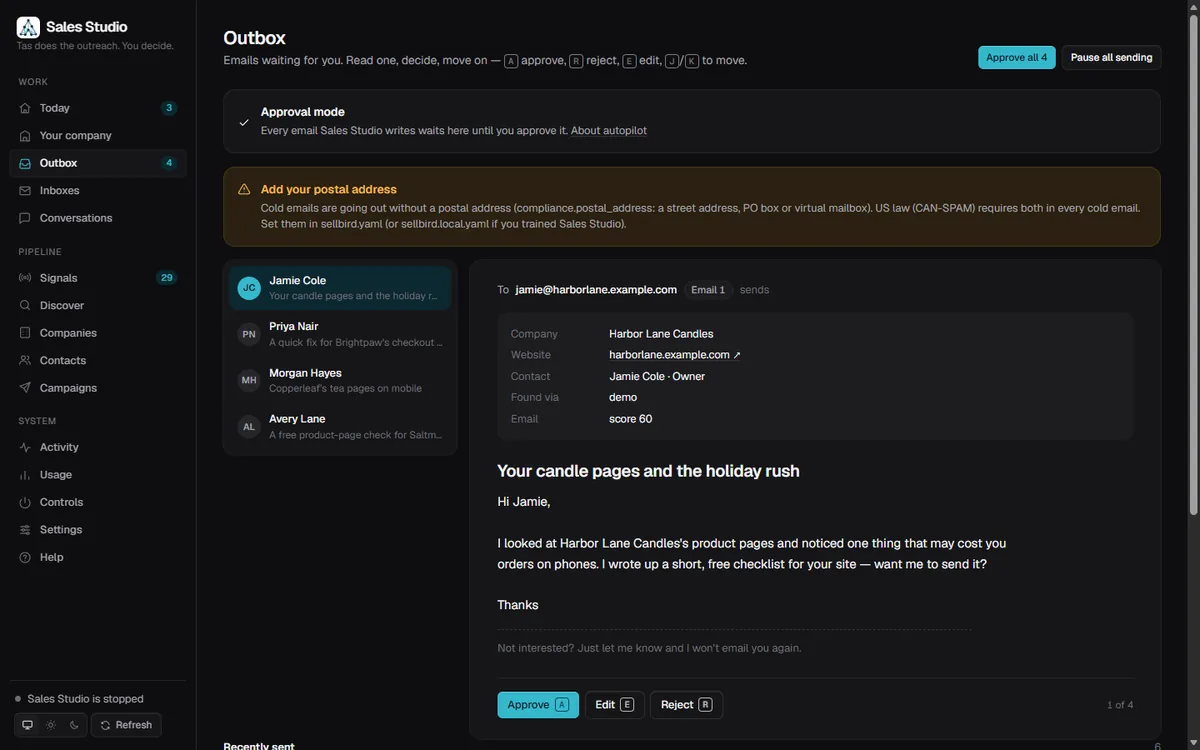
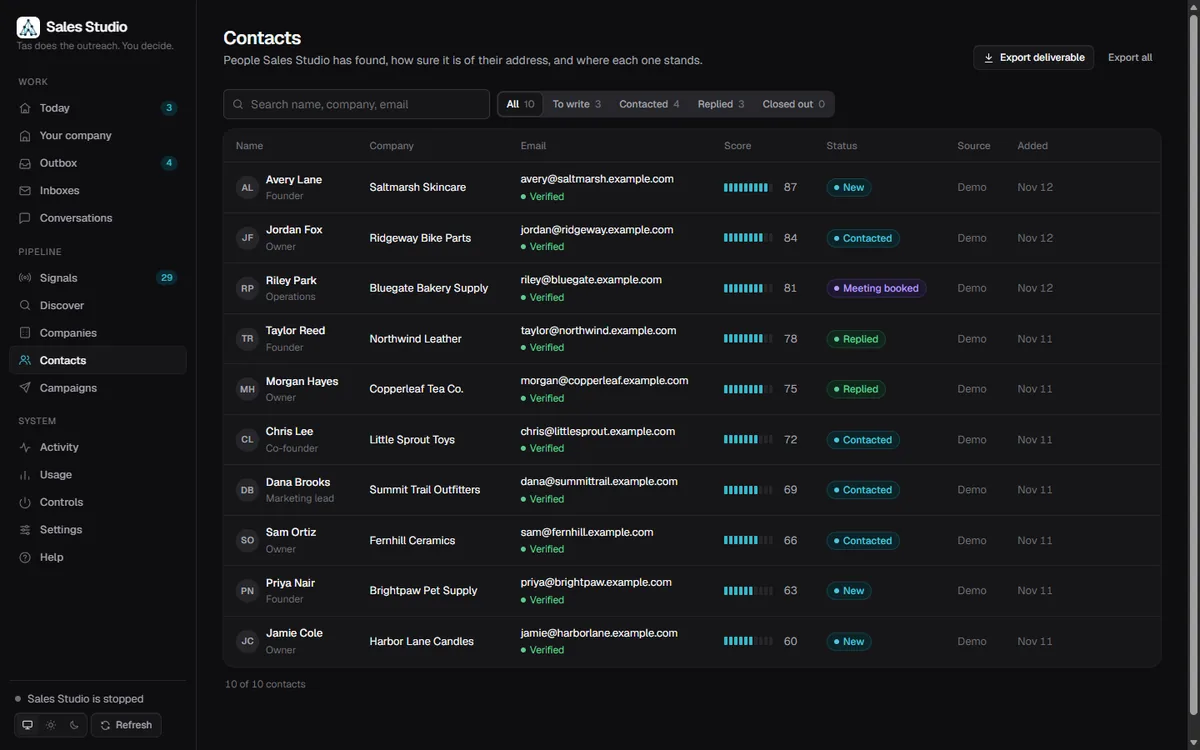
Real screenshots of ASAL’s Sales Studio build running on fictional example.com businesses — no real contacts.
AI cold email outreach specifications
| Agents | Finder (finds businesses and people), Writer (three-email sequence), Handler (reads and drafts replies) and Sender (sends from your mailbox) |
|---|---|
| Mailbox | Your Gmail, Microsoft 365 or SMTP mailbox, with a daily cap, send windows in the recipient's time zone and a check on every email |
| Approval | Each draft appears in Discord with Approve, Edit, Reject and Note buttons; autopilot is off by default |
| Model | Any model on OpenRouter that you pick; free models are rate limited and some let the provider keep prompts |
| Dashboard | A local web dashboard (outbox, companies, contacts, conversations and activity), with a phone view of the outbox |
| Rules | Verified addresses only; LinkedIn, Crunchbase and PitchBook are never scraped; opt-outs are never overwritten |
| Hosting | One deployment per client, run with Docker |
What's included in Sales Studio AI cold email outreach
- Setup of your Sales Studio deployment with your mailbox, your model and your data
- Training on your website and offer so Tas knows who to look for and what to say
- Prospect finding from public web sources, with the evidence behind each choice
- A three-email sequence per person, written from one real finding about their business
- Approval cards in your Discord channel for every email
- Reply handling that stops follow-ups when someone answers
How AI cold email outreach works with Sales Studio
Describe who you sell to
We learn your offer and your ideal customer from your website and a short brief.
Set up your deployment
Your mailbox, model and approval channel are connected on your own deployment.
Tas finds and writes
Tas finds businesses that fit and drafts a short email sequence for each.
You approve
Each email waits in Discord. Approve, edit, reject or leave a note.
Replies are handled
Replies are sorted, follow-ups stop when someone answers, and Tas drafts the response for you to approve.
What you need to get started with AI cold email outreach
- A mailbox you own (Gmail, Microsoft 365 or SMTP) and a domain set up for sending
- A clear description of who you sell to and what you offer
- A Discord channel and someone on your side who can approve emails
- A choice of model on OpenRouter, free or on your own key
Services that work well with AI cold email outreach
Growth Studio
Profiles, tracking, SEO, a website chatbot and Meta and Google ads, every live change approved and logged.
Approval Studio
Comments, DMs and your website chatbot in one place, answered in your voice, with a human in charge.
Website Chat Assistant
An AI assistant that answers FAQs on your site and hands enquiries to your team, live.
AI cold email outreach support and approvals
- Autopilot is off by default and stays off until someone turns it on in so many words.
- An email is only sent to an address that came back deliverable; guesses are never sent.
- Opt-outs are recorded and never overwritten, and a reply from anyone at a company stops the sequence for everyone there.
Why choose ASAL for AI cold email outreach?
Your mailbox, your data
Every deployment runs on the client's own mailbox, model and data.
You approve every email
Nothing is sent until a person says yes in Discord.
No invented claims
Each email uses something Tas observed about the business, not a guess.
AI cold email outreach FAQ: Sales Studio questions answered
Does Sales Studio send emails without my approval?
No. Every draft waits for approval in Discord. Autopilot exists but is off by default.
Which mailboxes does it work with?
Gmail, Microsoft 365 or any SMTP mailbox that you own.
Where do the prospects come from?
Public web sources. LinkedIn, Crunchbase and PitchBook are never read, and an email is only sent to a verified address.
Can you promise replies or meetings?
No. Outreach results depend on your offer, your list and your domain. We set it up, keep a person in charge and report what happened.
How much does Sales Studio cost?
It depends on the size of the deployment and the mailbox setup. Tell us what you sell through the chat or contact page and we will send a quote.
Talk to us about AI cold email outreach
Tell us what you sell and which job you want off your plate. Tas can answer questions right now, or reach the team directly.