Approval Studio
What is Approval Studio? AI comment and DM reply management explained
ASAL Approval Studio is an AI social media inbox. It collects new comments and direct messages from Instagram, Facebook, Threads, YouTube and WhatsApp, drafts a reply in your brand voice, checks it against your rules, and posts it to a private Discord channel with Send, Edit and Skip buttons. Only replies you approve are sent, through each platform's official API. Live chats from your website are tracked in the same place.
Comments and DMs are where interest turns into enquiries, but answering every one across several apps is slow, and leaving them unanswered loses leads. Approval Studio gathers them into one place and does the first draft for you.
Each draft is written in your brand voice and checked before you see it: no hype, no prices, no promises, no made-up numbers, no links you haven't allowed and no off-limits topics. Spam is flagged instead of answered. Where a video asks viewers to comment a keyword, the matching comment gets your pre-approved answer.
You approve with one tap, edit the text first, or skip. The same channel also shows every live chat from your website as it happens, so you can read what visitors ask the website assistant, reply into the chat yourself, or take the conversation over.
AI comment and DM reply management examples: Approval Studio in action
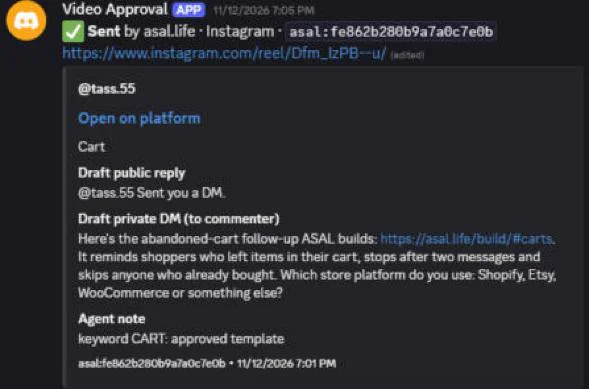
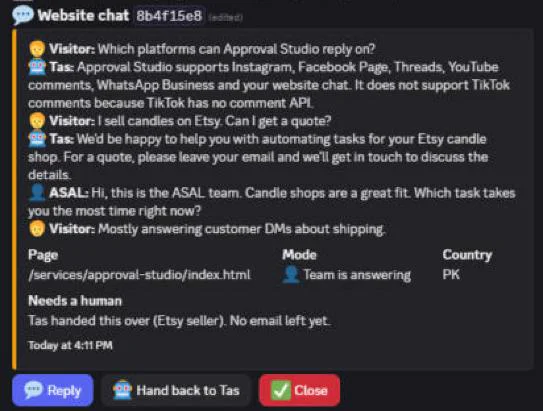
Real screenshots from ASAL's own approvals channel, using our test accounts.
AI comment and DM reply management specifications
| Networks | Instagram, Facebook Page, Threads, YouTube comments, WhatsApp Business (Cloud API) and your website chat |
|---|---|
| Where you approve | A private Discord channel with Send, Edit and Skip buttons |
| Drafting | AI drafts in your brand voice, checked against your rules; safe templates if the AI is unavailable |
| Rules checked | No prices, promises, unverified numbers, hype words, hashtags, unapproved links or off-limits topics |
| Sending | Only after approval, through each platform's official API |
| Alerts | Optional WhatsApp alert to the owner when a lead is waiting |
| Not covered | TikTok comments (TikTok has no comment API); Meta DMs only within the 24-hour reply window |
What's included in Approval Studio AI comment and DM reply management
- Connection of your Instagram, Facebook, Threads, YouTube and optional WhatsApp accounts
- A private approvals channel for your team
- Brand voice and reply rules written with you
- Comment keyword answers for video calls to action
- Live tracking of website chats, with reply and take-over buttons
- Ongoing running of the system on free-tier cloud hosting
How AI comment and DM reply management works with Approval Studio
New message arrives
Comments and DMs are collected from each network on a schedule; WhatsApp and website chats arrive instantly.
A reply is drafted
In your voice, checked against your rules, with a note on why it was written that way.
You decide
Send, Edit or Skip in Discord. Edits open a text box with the draft filled in.
It's sent
Approved replies go out through the platform's official API, and the card shows who approved it.
What you need to get started with AI comment and DM reply management
- A Facebook Page you fully control, an Instagram professional account linked to it, and Threads on the same login
- The Google account that manages your YouTube channel
- A Discord server (free) for the approvals channel
- A WhatsApp Business number on the Cloud API, if you want WhatsApp
Services that work well with AI comment and DM reply management
Website Chat Assistant
An AI assistant that answers FAQs on your site and hands enquiries to your team, live.
Reel Studio
Short-form video, scripted, voiced, animated and scheduled after you approve it.
Growth Studio
Profiles, tracking, SEO, a website chatbot and Meta and Google ads, every live change approved and logged.
AI comment and DM reply management support and approvals
- Nothing is sent without a human approval, and every card shows who approved it.
- If sending fails, the card shows the error and a Retry button.
- Your access tokens are stored as encrypted secrets, never in files or chats.
Why choose ASAL for AI comment and DM reply management?
A human in charge
AI drafts, people decide. That keeps replies on-brand and out of trouble.
One place for every network
No more switching between five apps to find who asked what.
We run it for ASAL too
ASAL's own comments and DMs go through the same system.
AI comment and DM reply management FAQ: Approval Studio questions answered
Does the AI reply to people automatically?
No. Every social reply is a draft until someone on your team taps Send. The only exception is the website chat assistant, which answers visitors straight away from your approved answers and hands anything else to your team.
Which platforms are supported?
Instagram, Facebook Page, Threads and YouTube comments, Instagram and Facebook DMs, WhatsApp Business through the official Cloud API, and your website chat. TikTok is not supported because it has no comment API.
Can I edit a draft before it is sent?
Yes. Tap Edit, change the text, and the updated draft comes back for your approval.
What happens to spam?
Spam and abuse are flagged and get no drafted reply.
How much does Approval Studio cost?
It depends on how many networks and brands you connect. Ask through the chat or contact page and we will send a quote.
Talk to us about AI comment and DM reply management
Tell us what you sell and which job you want off your plate. Tas can answer questions right now, or reach the team directly.